Vibe Code 10X Better With 1 Unbreakable Rule
By Kurt Wuckert Jr.
By Kurt Wuckert Jr. | March 27, 2026
Most people using Claude Code right now are doing it wrong. Not catastrophically wrong. Just wrong enough that they are getting 30% of the value and still calling it a revolution because 30% of Claude's best is still a lot better than hand-to-keyboard work.
I watch developers and non-developers alike sit down with Claude Code, type a paragraph of half-formed instructions from the top of their head, hit enter, and then wonder why the output is mediocre. They tweak. They re-prompt. They add more detail, backtrack, contradict themselves. Thirty minutes later they have something passable, and they post on X about how AI is going to replace everyone. It is not. Not if that is how you use it.
There is one rule I follow that separates my workflow from that chaos. One rule that turns vibe coding from a party trick into a production-grade engineering methodology. And I am going to give it to you.
Watch the Companion Stream of Kurt's Podcast to see this happen in action
The Problem With Talking Directly to Code
Claude Code is an execution engine. It is the best one I have used. If you have not used it yet, start with my guide on how to use Claude AI and come back here once you are building with it, because this article assumes you are already in the trenches. Claude Code reads your codebase, understands file dependencies, writes real code, runs your tests, and commits changes. It operates inside your project like a senior engineer who never sleeps and never forgets what you told it three hours ago.
So, the bottleneck is almost never Claude Code, and every developer I have watched struggle with AI tooling has confirmed this pattern within their first week of serious use.
When you type instructions directly into Claude Code from your own brain, you are doing what a contractor would do if you handed them a napkin sketch and told them to build you a house. You know what you want. You can picture it. But the gap between what you picture and what you actually communicate is enormous. You leave out constraints. You forget edge cases. You describe the feature but not the acceptance criteria. You say "build me a dashboard" when what you actually mean is "build me a responsive dashboard with three data sources, real-time updates, proper error states, loading skeletons, and a dark mode toggle that respects system preferences."
That gap between intent and instruction is where most vibe coding sessions fall apart, because the human prompt is incomplete. It is the same gap that exists between understanding what proof of work is conceptually and actually implementing it. Knowing the concept is not the same as specifying the implementation.
I wrote about how computation works at a fundamental level in my series on Bitcoin and Turing machines. The same principle applies here: the quality of your output is bounded by the precision of your input. A Turing machine does exactly what you tell it to do, and Claude Code behaves the same way with every prompt you give it; just with a little bit of novelty in how it infers your end-goals.
The Unbreakable Rule: Let Chat Write Your Prompts
Here is the rule. Memorize it. Tattoo it on your forearm if you have to:
Never feed Claude Code instructions you wrote yourself. Let Claude Chat write them for you.
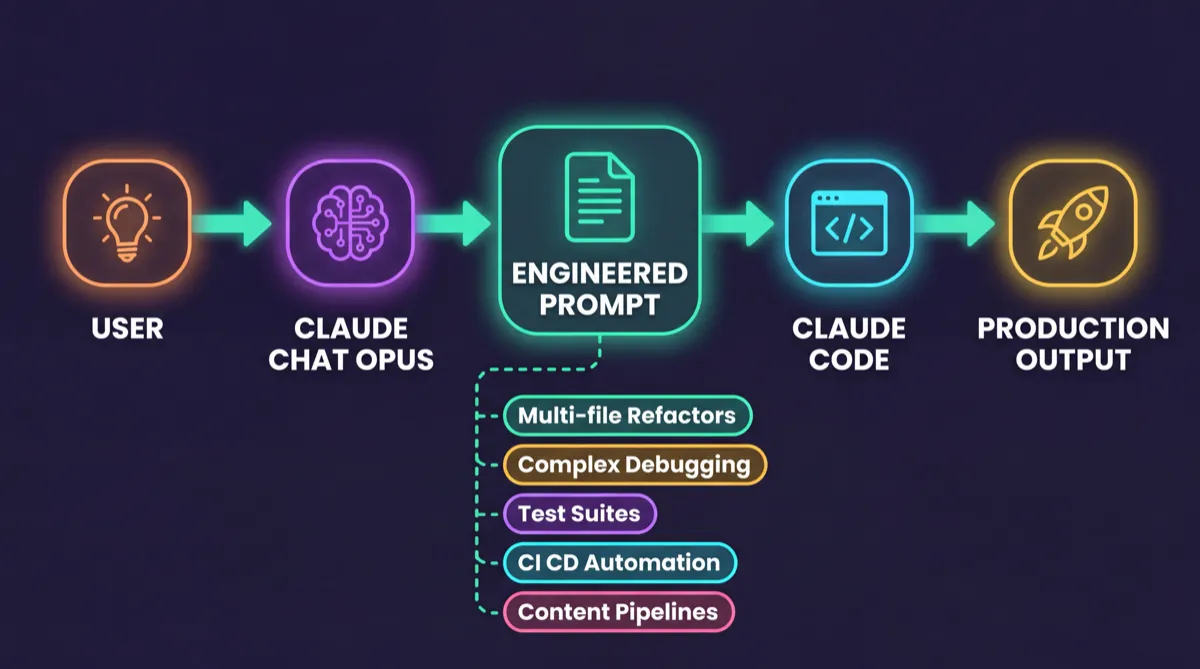
The workflow is five steps:
Step 1: Open Claude Desktop or claude.ai in your browser. Toggle to Chat mode. Make sure you are talking to Claude Opus, the reasoning model.
Step 2: Tell Opus what you want to accomplish. Be conversational. Be messy. This is where you get to think out loud. Say something like:
"I need to build a real-time analytics dashboard for my SaaS app. It should pull from three data sources, update every 30 seconds, handle errors gracefully, and look professional. I am using Next.js with Tailwind. Give me the best possible prompt to hand to Claude Code to build this."
Step 3: Opus will produce a structured, phased prompt. It will include a planning phase, acceptance criteria, quality checkpoints, and negative constraints. It will think of things you forgot. Read it. Refine it. Ask follow-up questions. Iterate in Chat until the prompt feels bulletproof.
Step 4: Only when the prompt is dialed in, copy it and paste it into Claude Code.
Step 5: Watch Claude Code execute with surgical precision, because it finally has instructions worth following.
This works because Opus and Code are optimized for different things. Prompt engineering is a reasoning task. It requires strategic thinking and structured decomposition of complex goals into phased, constraint-aware instructions. Code execution requires precision and deep file awareness across your entire project. Each model excels at fundamentally different cognitive work. When you type your own rough instructions directly into Code, you are asking the execution engine to also be your strategist. It can do it. But the results are dramatically worse than when you separate the two concerns.
This is the same principle behind every well-run engineering organization. The architect does not also pour the concrete. The product manager does not also write the unit tests. You let each role do what it does best. Claude Chat is your architect. Claude Code is your builder. Stop making your builder also be your architect. Anthropic themselves wrote about this separation of concerns in their engineering post on building effective agents, and it is one of the most important pieces of AI writing published in the last two years.
The Claude Code documentation walks you through the execution side. Anthropic even published how their own teams use Claude Code internally. But nobody tells you that the preparation side, the prompt engineering side, is where 80% of the value lives.
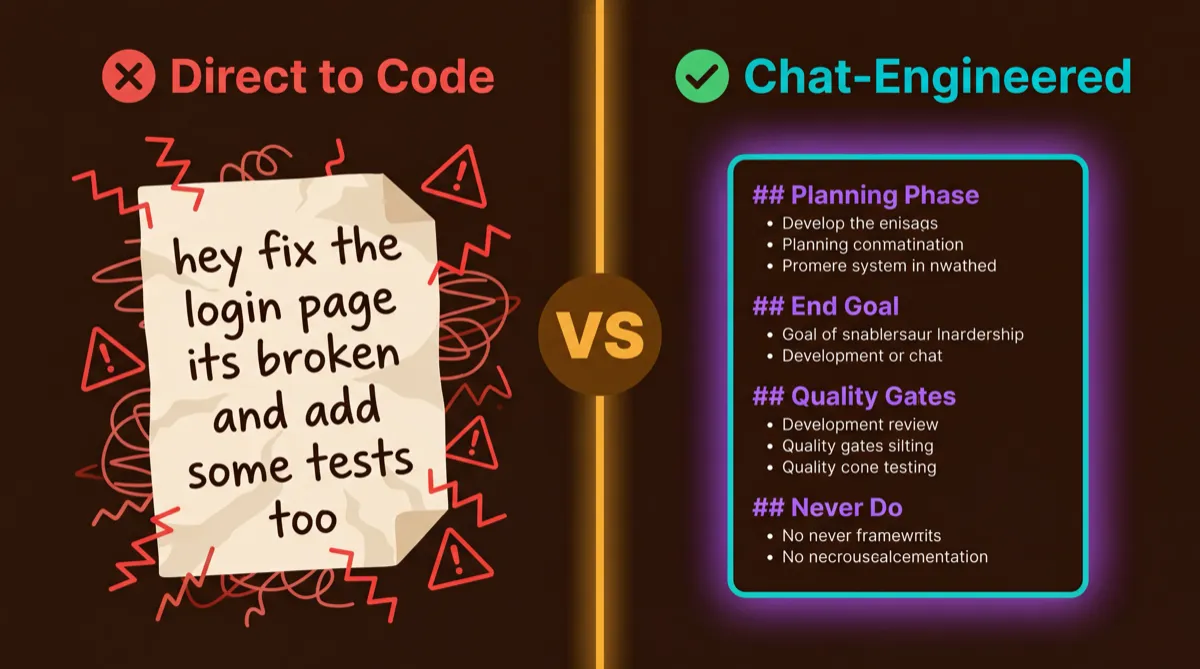
Here is what this looks like in practice. First, the prompt most people would type directly into Code:
Add authentication to my app. Use JWT tokens and make sure it's secure.
Also add a login page.
Now here is what Claude Chat (Opus) produces when you ask it to engineer the prompt instead:
## Phase 0 -- Pre-Execution Audit
Before writing any code, inventory the existing auth-related files in the
project. Identify the current routing structure, any existing middleware,
and the session/state management approach. Report findings before proceeding.

## Phase 1 -- JWT Authentication Backend
Implement JWT-based authentication with the following specifications:
- Access token: 15-minute expiry, signed with RS256
- Refresh token: 7-day expiry, stored in httpOnly secure cookie
- Token rotation: issue new refresh token on each refresh request
- Middleware: create requireAuth middleware that validates tokens
  and attaches decoded user to request object
- Error handling: return proper 401/403 responses with error codes,
  never leak token details in error messages

## Phase 2 -- Login Page Frontend
Create a login page that:
- Uses the existing design system components (check /components/ui)
- Includes email + password fields with client-side validation
- Shows inline error messages for invalid credentials
- Redirects to /dashboard on successful auth
- Persists auth state across page refreshes via refresh token

## Phase 3 -- Quality Audit
After implementation:
- Verify no tokens are logged to console or stored in localStorage
- Confirm CORS policy only allows expected origins
- Test: expired token returns 401, invalid token returns 403
- Test: refresh flow works after access token expiry
- Run existing test suite to confirm no regressions

## Negative Prompts
- NEVER store tokens in localStorage or sessionStorage
- NEVER log tokens or credentials to console, even in dev mode
- NEVER skip input validation on auth endpoints
- NEVER commit .env or secret key files
That is the difference. Same goal, wildly different level of specification.
Scenarios Where Chat-to-Code Changes Everything
This is not theoretical. I use this workflow every single day across wildly different types of work. Here are five scenarios where the Chat-first approach turned a mediocre output into something I shipped with confidence.
1. Building a Multi-File Feature or Refactor
What most people do: "Add authentication to my app with login, signup, and password reset."
What Chat produces: A phased prompt that specifies the auth provider, session management strategy, token storage location, middleware architecture, route protection rules, error handling for each failure mode, database schema for user records, and a verification checklist that includes testing the logout flow, expired token handling, and CSRF protection.
The difference between those two prompts is the difference between a feature that works in the demo and a feature that survives production traffic at 2 AM on a Saturday when nobody is watching.
2. Debugging a Complex Multi-System Issue
What most people do: "The checkout is broken. Fix it."
What Chat produces:
## Phase 0 -- Diagnosis Before Action
Read the checkout flow end-to-end: cart -> payment intent -> webhook handler
-> order confirmation. Map every external service call (Stripe, inventory
API, email service). Do NOT modify any code in this phase.

## Phase 1 -- Hypothesis Generation
Based on the code review, generate a ranked list of failure hypotheses:
- Payment webhook race condition (order created before payment confirmed)
- Inventory check returning stale cache data
- Stripe idempotency key collision on retry
- Email service timeout blocking the response chain
Report hypotheses before proceeding.

## Phase 2 -- Targeted Logging
Add structured logging at each integration boundary:
- Log request/response pairs for every external API call
- Log timestamps to identify where latency spikes occur
- Include correlation IDs that trace a single checkout across all services
- Format: JSON with { correlationId, service, action, duration_ms, status }

## Phase 3 -- Isolated Subsystem Testing
Test each service independently with known-good inputs:
- Stripe: create test payment intent, verify webhook delivery
- Inventory: query with known SKU, compare cached vs live response
- Email: send test confirmation, verify delivery and template rendering

## Negative Prompts
- NEVER apply fixes to production until root cause is confirmed in writing
- NEVER remove existing error handling to "simplify" debugging
- NEVER hard-code test credentials -- use environment variables
- NEVER skip the hypothesis report -- diagnosis first, fixes second
The rollback safety requirement is built into the negative prompts: no production changes until the root cause is confirmed. That single constraint has saved me from deploying a "fix" that was actually masking the real problem more times than I want to admit.
3. Writing Tests for Existing Code
What most people do: "Write tests for the user service."
What Chat produces: A prompt specifying 90% line coverage as the minimum, with explicit requirements for testing happy paths, error paths, boundary conditions, and integration points. It specifies mocking strategy (mock external APIs, use real database), assertion patterns (exact equality for critical values, snapshot for UI), and a requirement to run the full test suite after writing to verify nothing breaks.
4. Setting Up CI/CD or DevOps Automation
What most people do: "Set up GitHub Actions for my project."
What Chat produces: A prompt that specifies the deployment target, environment variable handling (never hardcode, use secrets), the build/test/deploy pipeline order, a smoke test that hits the health endpoint after deploy, automatic rollback if the smoke test fails, caching strategy for dependencies, and a requirement to notify the team channel on failure. It also includes negative constraints: never expose secrets in logs, never skip the test step, never deploy to production without a staging verification first.
5. Content and Marketing Automation Pipelines
This one is personal. I build and run my entire content pipeline with Claude. Articles, social posts, video descriptions, slide decks, schema markup. Every piece of content on kurtwuckertjr.com runs through a system built with this exact Chat-to-Code workflow. I tell Chat my brand guidelines, audience, and publishing cadence. Chat produces a prompt with voice rules, SEO constraints, cross-linking requirements, image generation specs, and quality gates. Code executes it and produces consistent, on-brand output every single time.
I described the foundations of how scripting and code work in another article, and went even deeper in the Bitcoin Script deep dive, and the same logic applies: the more precise your instructions, the more reliable your output. Garbage in, garbage out is not just a cliche. It is a law.
Anatomy of a Perfect Claude Code Prompt
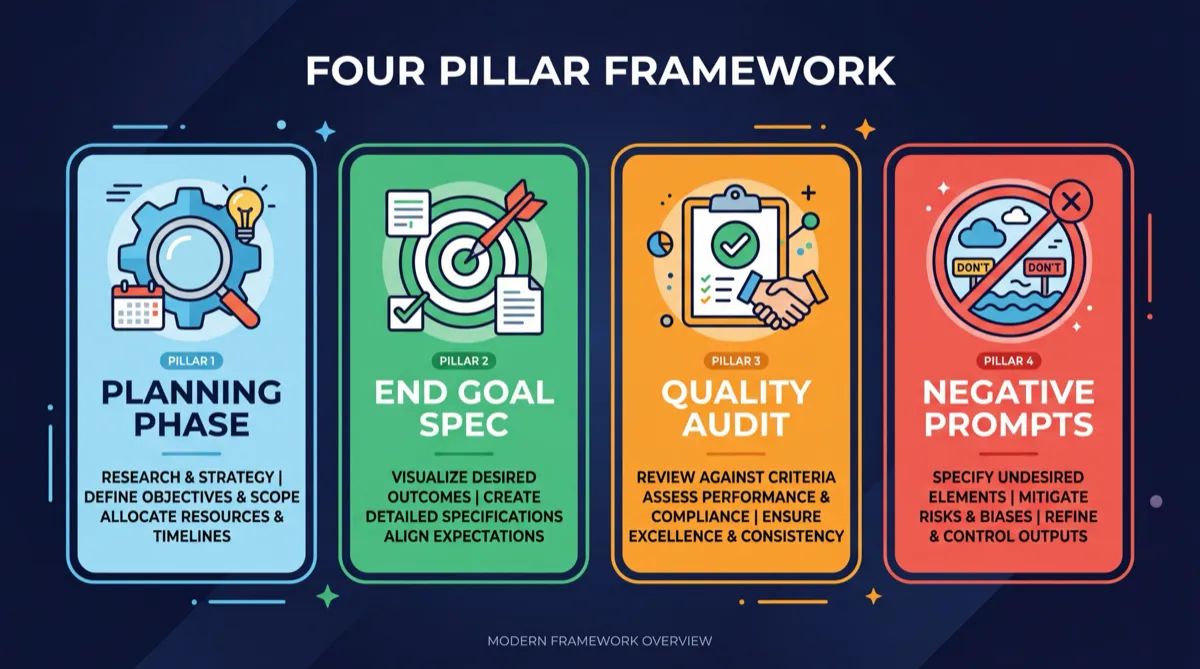
When you ask Chat to engineer a prompt for Code, it should always produce four components. If any of these are missing, send it back and ask for them explicitly.
1. Planning Phase
Every good prompt starts with research. Before Code writes a single line, it should understand the existing codebase, identify relevant files, check for patterns already in use, and map out the approach. This prevents the most common failure mode: Code charging ahead and building something that contradicts the existing architecture.
Tell Chat: "Include a planning phase where Code reads the existing codebase and identifies relevant patterns before writing anything."
2. End Goal Specification
Vague goals produce vague output. The prompt must describe what "done" looks like in concrete, verifiable terms. "Build a dashboard" becomes "build a dashboard with four cards showing total users, revenue, churn, and MRR growth, a line chart with 30-day trend data, a data table with sortable columns, and a responsive layout that works at mobile and desktop breakpoints."
Tell Chat: "Include specific acceptance criteria that I can verify. What should the finished output look like, feel like, and do?"
3. Quality Audit
The best prompts include built-in quality gates. Run the linter before delivering. Run the test suite. Check for accessibility violations. Verify that no TypeScript errors exist. These checkpoints catch problems before they reach you, which means you spend less time reviewing and more time shipping.
Tell Chat: "Include quality checkpoints that Code should run before presenting the output as complete."
4. Unbreakable Negative Prompts
This is the secret weapon. Negative prompts tell Code what to NEVER do, regardless of how tempting it might seem. Examples:
NEVER delete existing files without explicit confirmation
NEVER skip error handling for external API calls
NEVER use placeholder content in the final output
NEVER commit directly to main without creating a branch first
NEVER ignore existing test patterns when writing new tests
These constraints prevent the failure modes that waste the most time. Without them, Code will occasionally take shortcuts that seem efficient but create problems downstream.
Tell Chat: "Include at least five unbreakable negative prompts, things Code must never do under any circumstances."
When you look at how core system properties emerge from well-defined rules in Bitcoin, the parallel to prompt engineering is obvious. Constraints do not limit quality. They produce it. The Bitcoin network works precisely because the rules are rigid, clear, and non-negotiable. Your prompts should be too.
The Final Piece: Do Not Reinvent the Wheel
Even with the Chat-to-Code workflow, you are still building prompts from scratch every time unless you use pre-built tools that already encode best practices and domain expertise into reusable systems.
I spent months building systems that handle the repetitive parts of prompt engineering. Skills that know how to write articles in my voice. Agents that understand security audit patterns. Tools that handle database migrations with safety rails built in. Workflows that produce consistent, audited output across dozens of different task types.
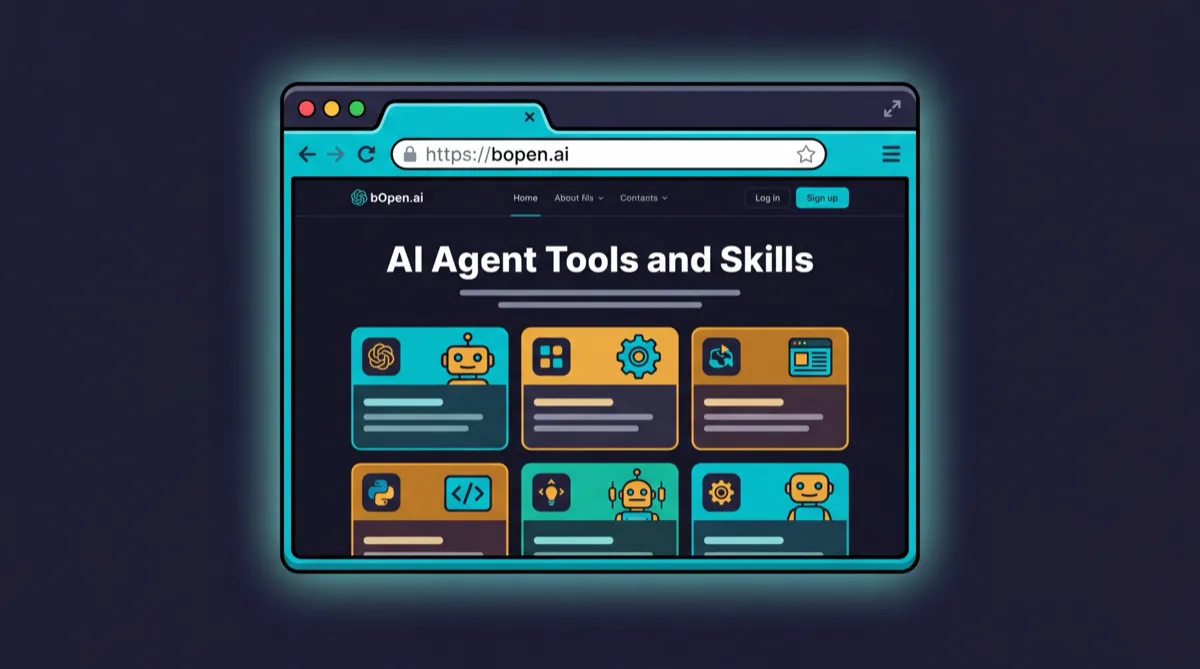
You do not have to build all of that yourself. Use the pre-built, audited and vetted tools, skills and agents available for free at bOpen.ai.
The team at bOpen builds infrastructure for agentic AI workflows, and everything is open, documented, and production-tested. Follow @bOpen_ai on X to see what is shipping. These tools are what I use every day. They are what this article was produced with. And they will save you hundreds of hours of prompt engineering work that someone has already done and battle-tested.
If you want to understand how large language models actually work at a technical level, the Claude API documentation is the best place to start. Anthropic's prompt engineering best practices page is worth reading cover to cover. And if you want to understand how Claude Code specifically operates, the official Claude Code docs are thorough and well-maintained.
But the tools at bOpen are where the leverage lives. They take the Chat-to-Code workflow and automate it. Instead of asking Chat to engineer a prompt every time, you invoke a skill that already encodes the planning phase, the acceptance criteria, the quality gates, and the negative constraints. You go from prompt-engineering-per-task to prompt-engineering-once, encoded into reusable systems.
The concepts behind this are the same ones I write about across my Bitcoin glossary, the concept of encoding good design into immutable systems that produce reliable output. Whether it is a blockchain protocol or an AI workflow, the principle is identical: spend the time upfront to get the rules right, and the system will outperform manual effort every single time.
Go Build Something
The rule is simple. Let Chat think. Let Code build. Stop trying to do both at once.
Your next Claude Code session, try it. Before you type a single instruction into Code, open Chat and say: "Make me the best prompt for Claude Code to accomplish this goal." Watch what comes back. Refine it. Then hand it to Code and see the difference.
I have shipped more production software in the last year than in the previous five, because I stopped trying to be the strategist and the builder simultaneously. I let the right tool handle each job, and I focused on the one thing humans are still better at: knowing what to build in the first place.
The tools are here, the workflow is proven, and the only thing standing between you and 10X output is a bad habit of typing instructions from the top of your head instead of letting the reasoning model do what it was built to do.
Break the habit. Follow the rule.
And if you want a head start, try Claude right now.
Be good to each other. And go build something.
Kurt Wuckert Jr. is the founder of bOpen and GorillaPool, and serves as Chief Bitcoin Historian at CoinGeek. He builds AI agent infrastructure and ships production software using Claude Code daily. Follow him at kurtwuckertjr.com and @kurtwuckertjr on X.